
How to Bill PMB Conditions at 300%
How to Bill PMB Conditions at 300%
What: A practice setting plus a Capture Invoice prompt that lets a treating provider charge up to 300% of the medical scheme rate (MSR) for a Prescribed Minimum Benefit (PMB) condition, once the matching diagnosis code is added to the invoice.
Why: South African medical schemes are legally required to pay a PMB claim in full if it is billed at 300% or less of the scheme rate. Healthbridge Nova calculates that uplift automatically instead of a biller working it out by hand for every affected line.
When: When a provider is treating a genuine emergency or life-threatening PMB condition, most commonly a patient admitted to hospital, not for routine or elective care.
Steps
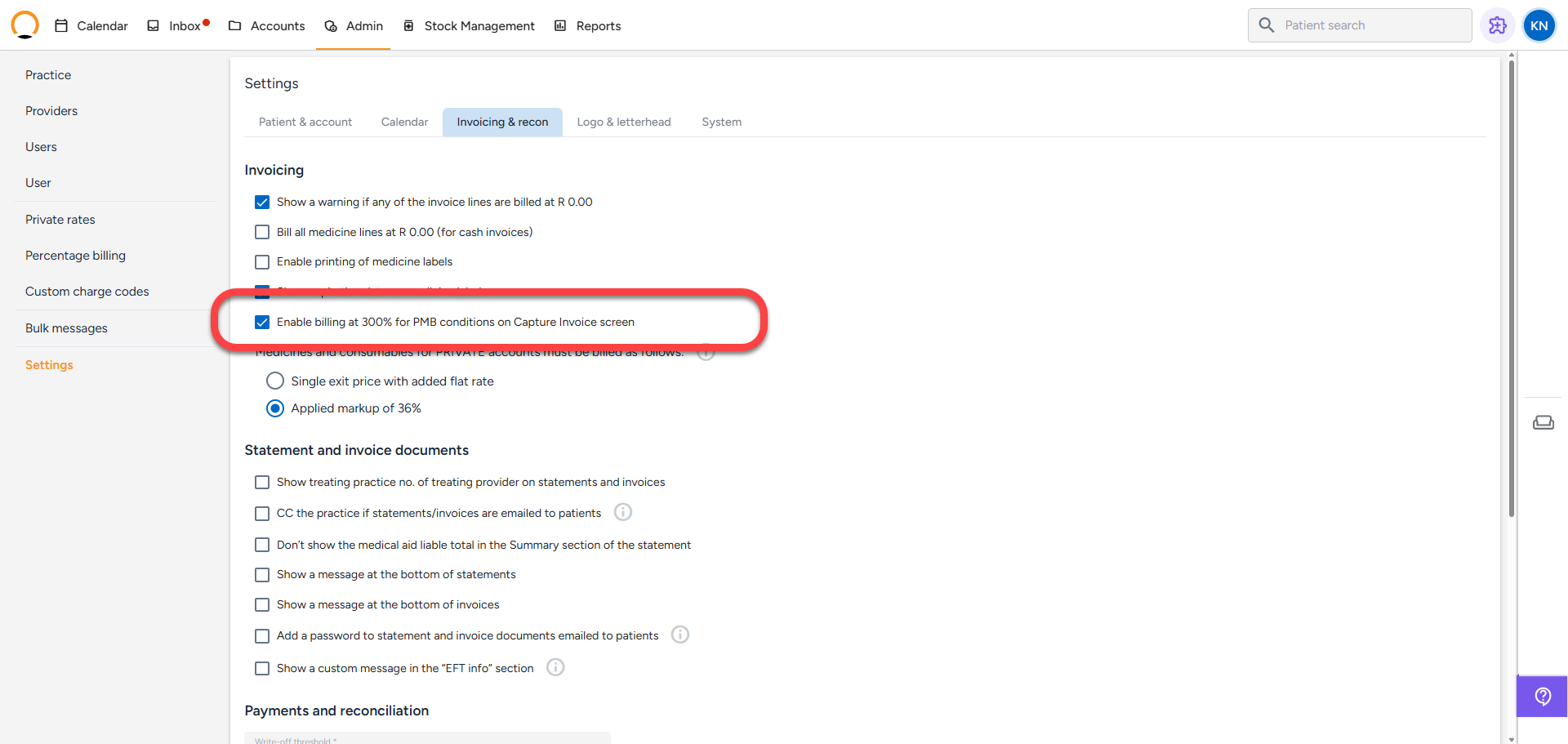
1. Tick 'Enable billing at 300% for PMB conditions on Capture Invoice screen'
Location: top navigation bar › click 'Admin', then click 'Settings' in the left sidebar, then click the 'Invoicing & recon' tab
This checkbox is off by default and lives under the 'Invoicing' heading on the 'Invoicing & recon' tab, alongside the other invoicing toggles. Ticking it does not change any pricing by itself, it only makes the PMB prompt available further down on the Capture Invoice screen, for every provider at the practice.
2. Click 'Save'
Location: Invoicing & recon tab › bottom right, click 'Save'
A confirmation toast appears and the setting is now live for the whole practice.
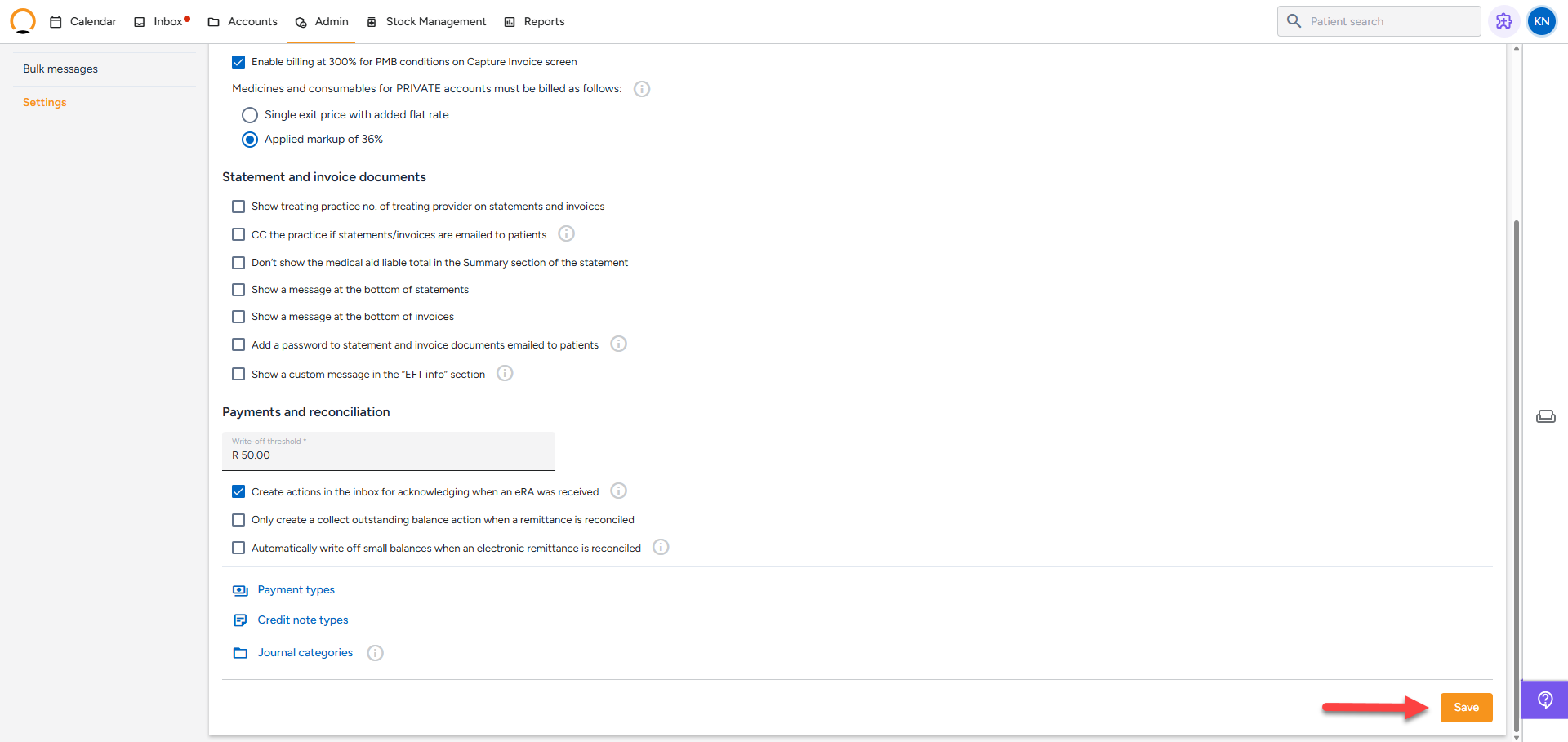
You should see: an 'Invoicing & recon setting saved' toast in the bottom right, and the checkbox stays ticked when you reload the page.
3. Open Capture Invoice for a medical aid patient and choose the treating provider
Location: Accounts › open the patient's account › left sidebar, click 'Capture invoice'
The PMB prompt in step 4 only shows once every one of these is true, so it is worth setting them up correctly first:
- The account has a medical aid 'Scheme' recorded against it (visible under the patient name at the top of the screen).
- 'Invoice type' is set to 'Medical Aid' or 'Cash' (it will not show for 'Medical insurance' or 'No Charge').
- 'Treating provider' is set to a specialist, per Nova's own speciality categories (Gynaecologist, Physician, Surgeon, and similar are 'Specialist'; General Practitioner is its own separate category, see the note below step 4).

4. Add the PMB diagnosis code
Location: Capture Invoice screen › 'Search diagnosis...' field
Type any part of the ICD-10 code or condition name and select it from the dropdown. Nova checks the code you pick against Medprax's list of PMB-flagged diagnoses immediately, there is no separate lookup step.
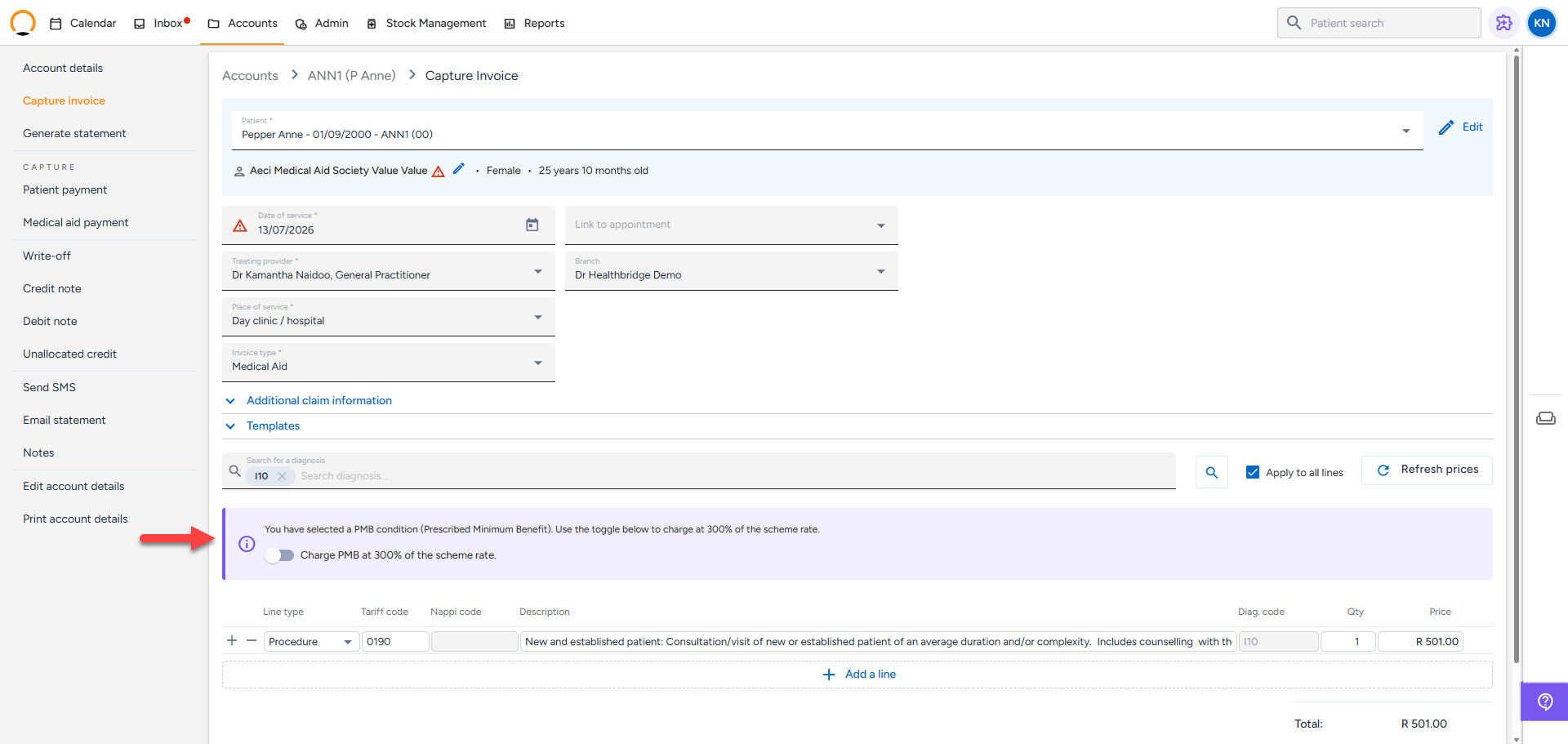
You should see: a purple notice above the invoice lines: "You have selected a PMB condition (Prescribed Minimum Benefit). Use the toggle below to charge at 300% of the scheme rate.", with a 'Charge PMB at 300% of the scheme rate.' toggle underneath it, off by default.
5. Toggle 'Charge PMB at 300% of the scheme rate.' on
Location: PMB notice › click the toggle
Every invoice line already on the invoice, and any added afterwards, is recalculated from the scheme rate (MSR) times 300%. This ignores any private rate or percentage billing rate that would otherwise have applied to those lines.
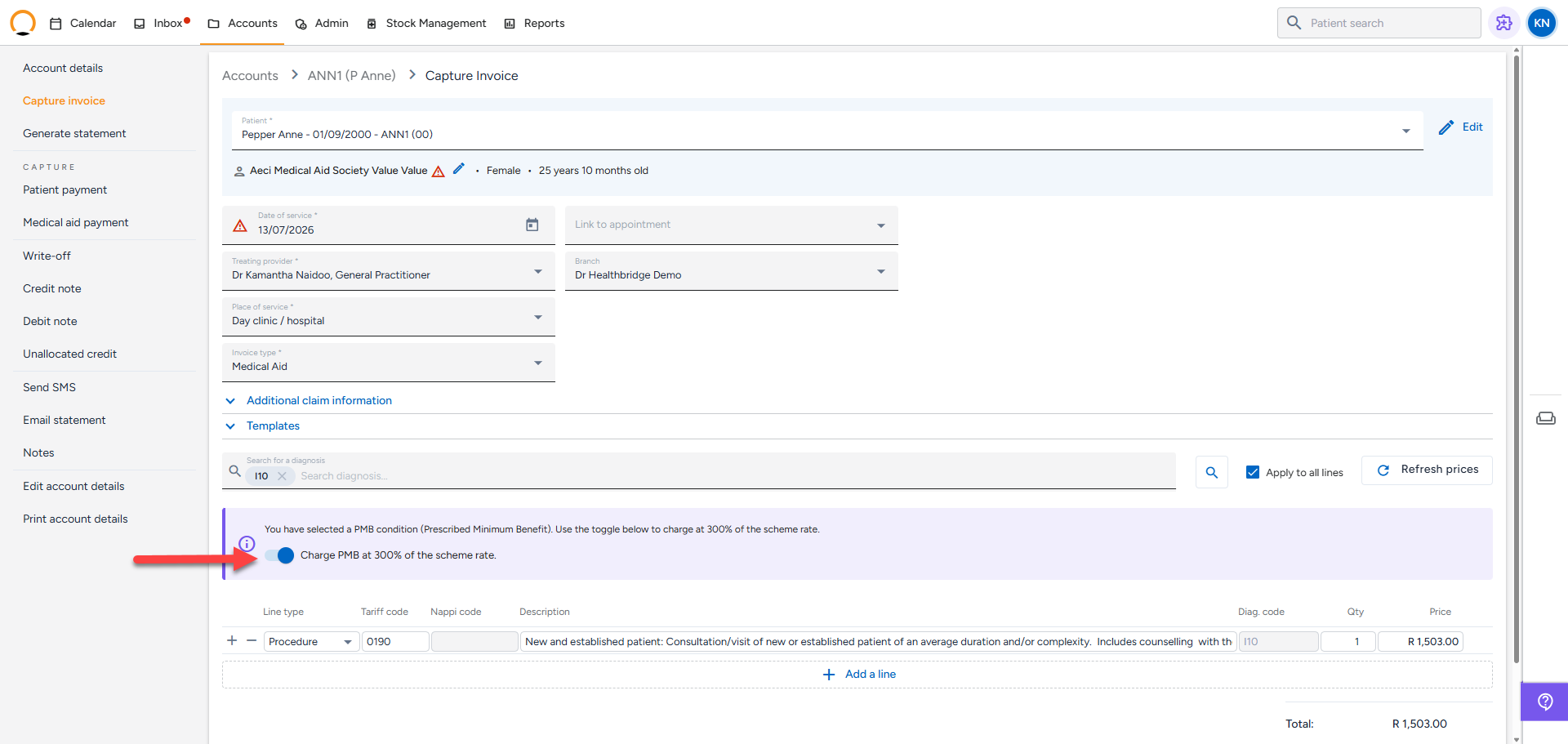
Note: A consultation line priced at R 575.44 recalculated to R 1,726.32 the instant the toggle was switched on, exactly 300% of the original, confirming Healthbridge Nova applies the uplift immediately without needing a separate 'Refresh prices' click.
Which conditions actually qualify
Prescribed Minimum Benefits are a legal requirement, not a Nova-specific concept.
PMB stands for Prescribed Minimum Benefit. South African law requires every medical scheme to cover the diagnosis and treatment of roughly 300 conditions, including 27 defined chronic diseases and medical emergencies, regardless of which plan or option the member is on. If a provider bills 300% or less of the scheme rate for a genuine PMB claim, the scheme must pay the account in full. Diagnosis codes belonging to this category are flagged centrally in Medprax, which is what Nova checks against in step 4.
The PMB prompt is not proof the claim qualifies: Hhealthbridge Nova shows the prompt purely because the diagnosis code matches Medprax's PMB list, the account is a medical aid account, and the invoice type and provider fit the rules above. It does not check whether the treatment was actually an emergency or life-threatening, which is the legal test for a genuine PMB claim. A routine or elective visit for a PMB-listed condition (for example, a stable blood pressure check-up for I10, hypertension) is not automatically billable at 300% just because Healthbridge Nova offers the toggle. Charging 300% for care that was not genuinely an emergency risks a dispute or a repayment claim from the scheme later on.
How this interacts with other pricing features
The PMB toggle overrides the normal pricing hierarchy rather than adding to it.
State | What Nova charges |
|---|---|
PMB toggle off (default pricing, including any private rate or percentage billing rate already configured for the line) | Whatever the normal price lookup returns, e.g. R 575.44 |
PMB toggle on, same line, same existing private rate or percentage billing rate | 300% of the scheme rate (MSR) only, e.g. R 1,726.32, the private rate or percentage rate is ignored while the toggle is on |
PMB 300% replaces, it does not stack: If a provider already has a contracted network rate or a percentage billing rate set up for a scheme, turning the PMB toggle on for a line does not add 300% on top of that rate. It replaces the whole pricing calculation for that line with 300% of the scheme rate, calculated fresh.
Which invoice line types are affected
- Procedures — recalculated from the scheme rate (MSR).
- Modifiers — the unit price is increased to 300% before being sent to the modifier calculation, so a modifier that itself takes a rand value (rather than a fixed percentage) is uplifted too.
- Medicines — recalculated from the standard Medprax price.
- Consumables — recalculated from the standard Medprax price.
Note: Nova assumes every medicine or consumable added while the toggle is on is covered by the PMB benefit, it does not check this against an approved formulary. It is up to the provider to only add items that genuinely form part of the PMB-covered treatment.
Frequently asked
Q: Does the PMB prompt show for every diagnosis code?
No, only if the code matches Medprax's list of PMB-flagged diagnoses, roughly 300 conditions including 27 chronic diseases and emergencies. Most day-to-day diagnoses will not trigger it.
Q: What if I already have a private rate or percentage billing rate configured for this scheme?
See "How this interacts with other pricing features" above. Turning the PMB toggle on ignores both and calculates purely from the scheme rate, it does not combine with them.
Q: Can a General Practitioner use this feature?
Nova's speciality categories intend this prompt for the 'Specialist' category only, but live testing confirmed the prompt currently appears for General Practitioners too. Regardless of what Nova shows, only bill 300% for a genuine emergency or life-threatening PMB condition, which is rarely something treated in a GP's own consulting rooms.
Q: What happens if I remove the PMB diagnosis code after the toggle is already on?
This is not yet fully defined, test it in your own environment before relying on it rather than assuming the price reverts automatically. If a line looks wrong after removing a PMB diagnosis, manually click 'Refresh prices' or remove and re-add the line.