
Stock Level Listing
The main stock screen provides a comprehensive overview of your inventory, This information is invaluable for effective inventory management and timely replenishment.
This is the main inventory screen, where all current stock items are listed reflect the following:
- Item Nappy code
- Item Description
- Item quantities
- Stock thresholds and expiry dates
- Days stock has been on hand (stock age) This view helps you monitor what’s on hand and when to reorder.
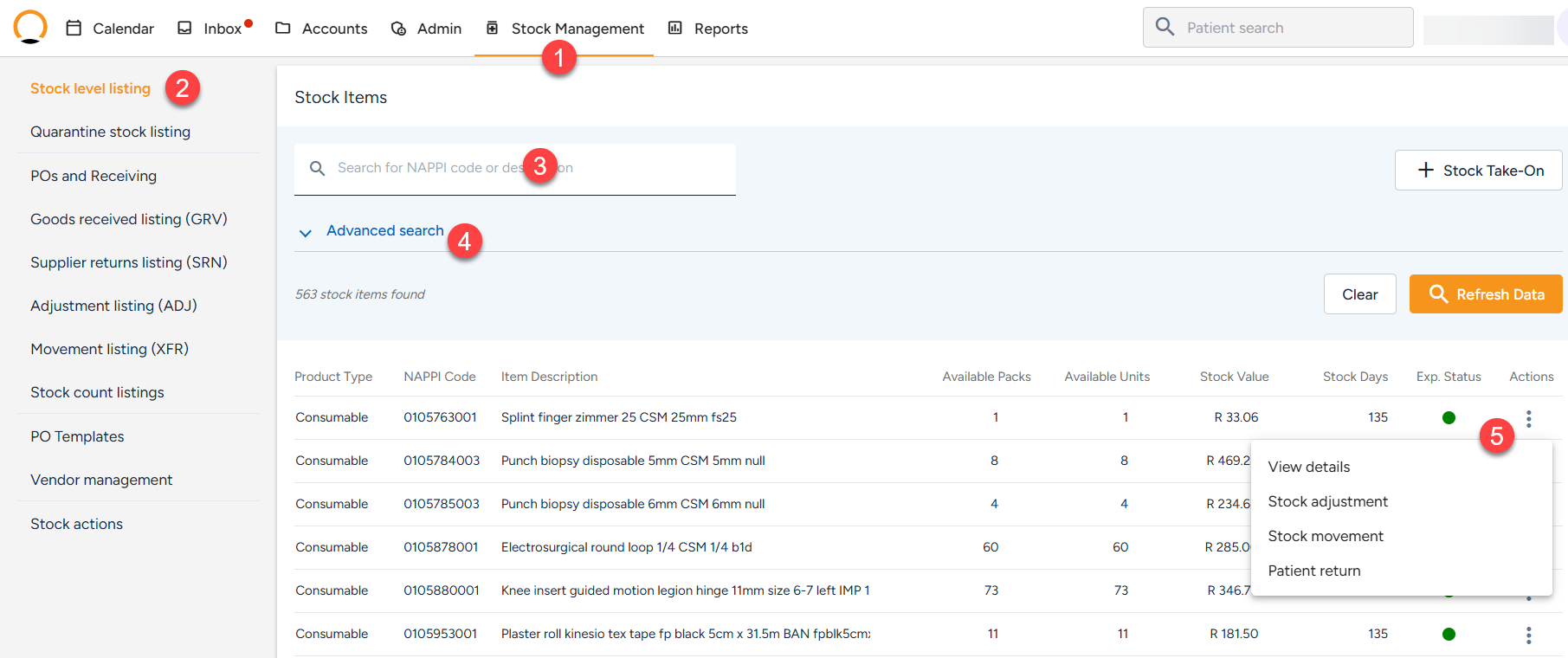
How to view/locate a Stock item
- Navigate to the to "Stock Management" tab.
- Select the "Stock level listing" option.
- Search for the item either by using the Nappy Code or Item Description.
- The user can also make use of the Advanced Search to filter by:
- Product Type (Medicine/Consumable)
- Expiry Status (Not Expired / Imminent / Expired)
- Stock Days
- The user also has more options avalible by selecting the three-dot menu (⋮) next to a stock item this allows for the user to View details,Stock adjustments,Stock movements and Patient Returns.