
Stock Reports
Running regular stock reports is essential for maintaining your practice's inventory health, preventing waste, and taking the guesswork out of ordering
How to Access Your Reports
- To access your stock reports, navigate to the "Stock Management" tab.
- Select "Stock Level Listing" option.
- Select the required report avalible in the drop down menu and generate a comprehensive overview of your stock's status.
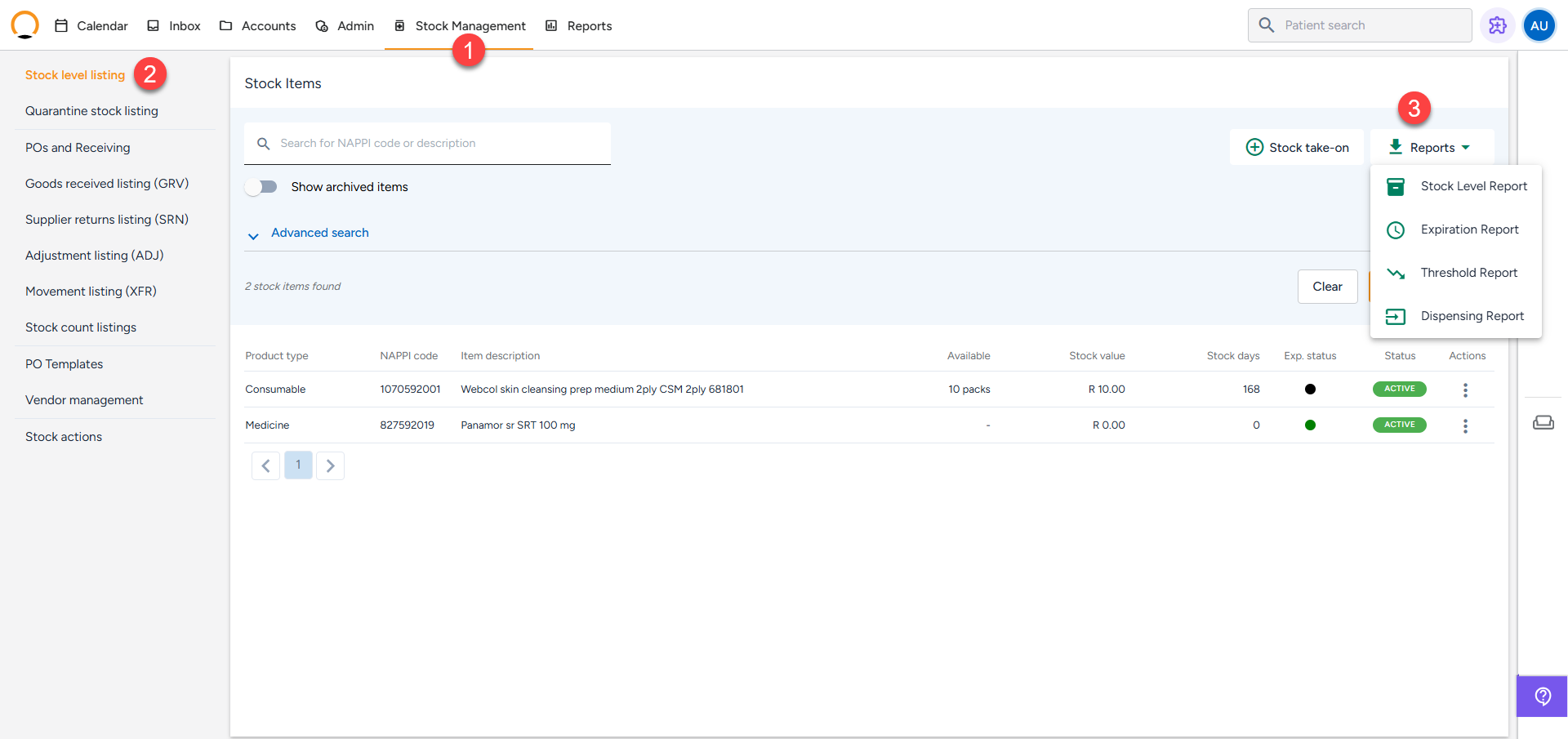
Explanation of the Different Reports
1. The Stock Level Report (Your Master List)
- What it does: This report provides a total overview of your current stock on hand. It acts as a complete extract of your digital storeroom.
- What it shows: It details the NAPPI codes, item descriptions, bin locations, batch numbers, receipt dates, expiration dates, prices per pack, and your set thresholds. It also calculates Stock Days, which tells you exactly how long a specific batch has been sitting on your shelf.
2. The Threshold Report (Your Reorder List)
- What it does: This report highlights items that have dropped below your safe minimum order quantity and need to be reordered.
- What it shows: Instead of manually guessing what you need, this report gives you comprehensive "reorder recommendations" based on your stock consumption and stock age, telling you exactly when it is a good time to buy more supplies.
3. The Expiration Report (Your Waste Prevention List)
- What it does: This report shows you exactly what stock is expiring soon.
- What it shows: It triggers based on the custom "expiration alert days" you configured for each item (e.g., warning you 30 days before the expiry date). This allows you to prioritize using those items first or safely move them to Quarantine before they expire.
4. The Dispensing Report (Your Movement Tracker)
- What it does: This report tracks product movement by showing you exactly what stock has been dispensed.
- What it shows: It provides transparency by detailing the date, NAPPI code, product type, and batch of the dispensed items. This is highly useful for tracking clinical usage and addressing concerns about unauthorized stock sales or shrinkage.